


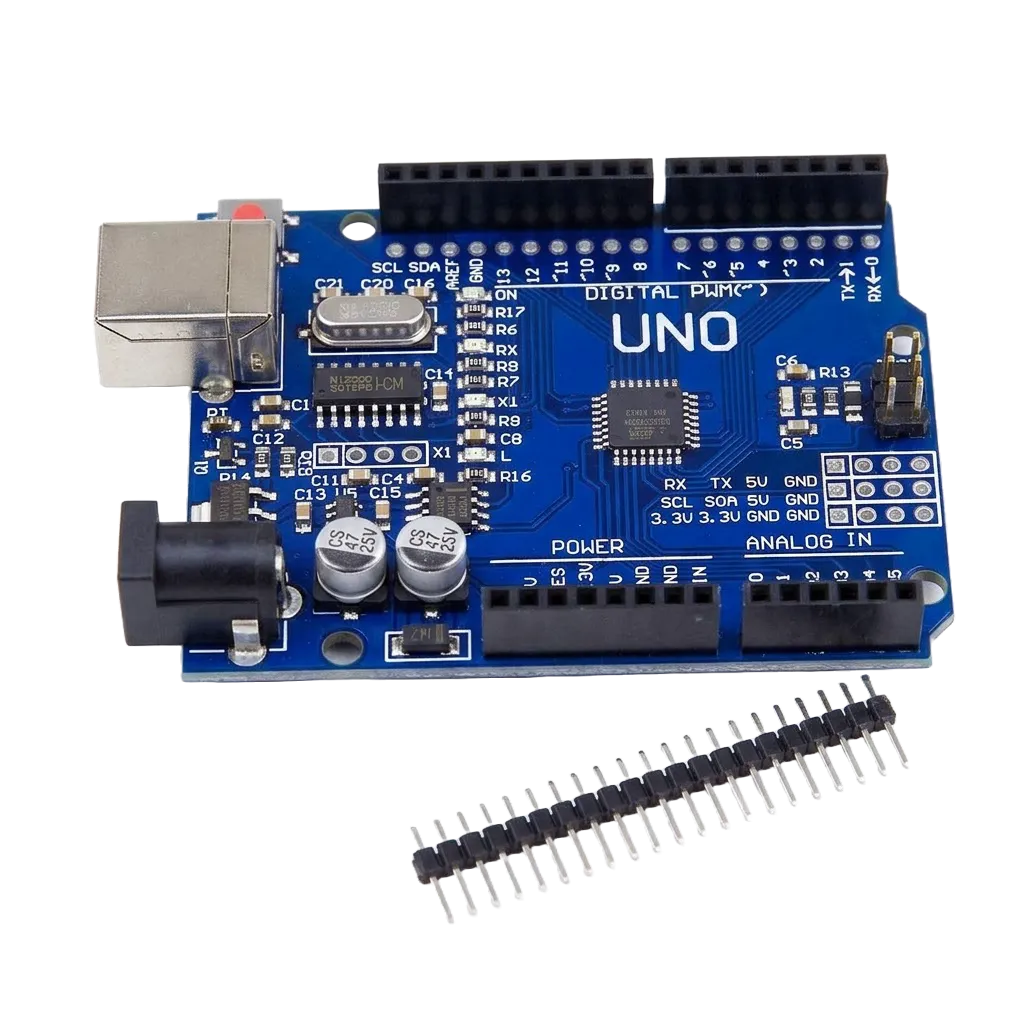
Arduino Uno R3 SMD Compatible Board – ATmega328P
The Arduino Uno R3 SMD Compatible Board – ATmega328P is a versatile microcontroller development board designed for electronics learning, robotics, automation and DIY projects. Featuring an ATmega328P surface-mount microcontroller, 14 digital I/O pins, 6 analog inputs and a 16 MHz clock, it provides a practical platform for programming and prototyping.
Key Features:
- Arduino Uno R3-compatible development board
- ATmega328P SMD microcontroller
- 5V operating logic
- 16 MHz clock speed
- 14 digital input/output pins
- 6 PWM-capable digital pins
- 6 analog input channels
- USB Type-B connection for programming and communication
- DC barrel jack for suitable external power
- Onboard reset button
- Power and serial communication indicators
- I2C, SPI and UART communication support
- Compatible with Arduino IDE and many Uno-compatible libraries
- Standard Uno-style expansion header layout
- Suitable for robotics, sensors, automation and STEM projects
Package Includes: 1 × Arduino Uno R3 SMD Compatible Board.
Important: This is an Uno R3-compatible board with a soldered SMD microcontroller, not a removable DIP microcontroller. USB cable and additional accessories are not included unless explicitly stated in the package contents.
Buy Arduino Uno R3 SMD online from Yagobotix for educational electronics, Arduino programming and robotics projects.
Arduino Uno R3 SMD Compatible Board – ATmega328P
1. What Is an Arduino Uno R3 SMD Board?
The Arduino Uno R3 SMD is a microcontroller development board designed for learning electronics, programming and embedded systems.
Based on the ATmega328P microcontroller, it provides digital and analog input/output connections for sensors, LEDs, motors, displays and other electronic components.
The SMD version uses a surface-mounted microcontroller that is soldered directly onto the PCB.
Unlike socketed DIP versions, the SMD microcontroller cannot be removed by simply pulling it out of a socket.
This Arduino Uno R3-compatible board is suitable for beginners, students, makers and robotics enthusiasts who want to develop interactive electronic projects.
2. What Can You Build With Arduino Uno R3 SMD?
The Arduino Uno R3 SMD board can be used in projects such as:
- LED blinking and lighting control
- Obstacle avoidance robots
- Line-following robots
- Ultrasonic distance measurement
- Temperature and humidity monitoring
- Automatic plant watering
- Bluetooth-controlled robots
- Motion detection systems
- IR remote-controlled projects
- LCD and seven-segment displays
- Servo motor control
- DC motor control using motor drivers
- Digital door alarms
- Environmental monitoring
- STEM education and science exhibitions
The board can read sensor inputs, execute programmed instructions and control connected output devices.
3. Who Is It For?
The Arduino Uno R3 SMD is suitable for:
- School students
- College and engineering students
- Arduino beginners
- Robotics learners
- Electronics hobbyists
- STEM educators
- DIY project makers
- Embedded systems developers
- Arduino training centres
- Science exhibition participants
It is particularly useful for learning C/C++-based Arduino programming, digital electronics and hardware interfacing.
4. How Does Arduino Uno R3 SMD Work?
The Arduino Uno R3 SMD uses an ATmega328P microcontroller to execute instructions stored in its program memory.
A computer can upload programs to the board through its USB connection.
After uploading, the microcontroller executes the program and interacts with connected sensors or output devices.
Input Processing
Sensors and switches provide electrical signals to digital or analog input pins.
Microcontroller Processing
The ATmega328P processes these inputs according to the uploaded program.
Output Control
Digital pins can control LEDs, buzzers and external driver circuits.
PWM-capable pins can generate pulse-width-modulated control signals.
Working Principle
Sensors / Switches → Arduino Input Pins → ATmega328P Microcontroller → Output Signals → LEDs / Motor Drivers / Displays
The Arduino can run uploaded programs without remaining connected to a computer, provided it receives suitable power.
5. Arduino Uno R3 SMD Technical Specifications
| Specification | Details |
|---|---|
| Board Type | Arduino Uno R3 Compatible |
| Microcontroller | ATmega328P SMD |
| Architecture | 8-bit AVR |
| Operating Voltage | 5V |
| Clock Frequency | 16 MHz |
| Digital I/O Pins | 14 |
| PWM Output Pins | 6 |
| Analog Inputs | 6 |
| ADC Resolution | 10-bit |
| Flash Memory | 32 KB |
| SRAM | 2 KB |
| EEPROM | 1 KB |
| USB Connector | Type-B |
| External Power Input | DC Barrel Jack / VIN |
| Recommended External Input | Typically 7–12V for Uno R3 designs |
| Communication | UART, I2C, SPI |
| Reset Button | Present |
| Board Colour | Blue |
| Microcontroller Package | Surface Mount |
| Uno-Style Dimensions | Approximately 68.6 × 53.4 mm |
| Quantity | 1 Board |
These are standard ATmega328P-based Arduino Uno R3 design specifications. Component substitutions on compatible boards, especially the USB interface and power regulation, should be checked against the actual stock.
Important Technical Notes
- The microcontroller operates at 5V logic levels.
- The 3.3V output is intended only for suitably rated low-current devices.
- The I/O pins cannot directly supply high-current loads such as DC motors.
- Use a motor driver for motors and a suitable driver circuit for pumps or relays when necessary.
- External power must meet the board’s electrical requirements.
- The microcontroller is permanently soldered to the PCB.
- USB programming requires a compatible data cable.
- Avoid connecting external voltages directly to microcontroller pins beyond their allowable ratings.
6. Arduino Uno R3 SMD Pinout
Digital Pins
The board provides 14 digital I/O pins numbered D0 to D13.
| Pins | Function |
|---|---|
| D0 (RX) | UART receive |
| D1 (TX) | UART transmit |
| D2–D13 | General digital input/output |
| D3, D5, D6, D9, D10, D11 | PWM output |
| D10 | SPI SS |
| D11 | SPI MOSI |
| D12 | SPI MISO |
| D13 | SPI SCK / Built-in LED |
Analog Pins
| Pins | Function |
|---|---|
| A0–A3 | Analog inputs |
| A4 | Analog input / I2C SDA |
| A5 | Analog input / I2C SCL |
Power Pins
| Pin | Function |
|---|---|
| VIN | External supply input |
| 5V | Regulated 5V rail |
| 3.3V | Low-current 3.3V output |
| GND | Ground |
| RESET | Microcontroller reset |
| IOREF | Board logic-voltage reference |
Additional Interfaces
The board provides interfaces for UART, I2C and SPI communication.
SPI signals are also available through the appropriate ICSP header on standard Uno-compatible designs.
7. How to Connect Arduino Uno R3 SMD to a Computer
Required Components
- 1 × Arduino Uno R3 SMD Compatible Board
- 1 × USB Type-A to Type-B Data Cable
- Computer with Arduino IDE
Connection Procedure
- Install Arduino IDE on your computer.
- Connect the USB Type-B end of the cable to the Arduino Uno.
- Connect the USB Type-A end to the computer.
- Open Arduino IDE.
- Select Arduino Uno as the board.
- Select the appropriate serial port.
- Open an Arduino example program.
- Click Upload.
- Wait for successful compilation and uploading.
- Run the programmed project.
USB Driver Note
Some Uno-compatible boards use alternative USB-to-serial converter chips.
Depending on the actual chip and operating system, a separate USB driver may be required.
Verify the USB interface IC before recommending a specific driver.
8. Arduino Uno R3 SMD Example Code
The following program blinks the Arduino’s onboard LED.
void setup() {
  pinMode(LED_BUILTIN, OUTPUT);
}

void loop() {
  digitalWrite(LED_BUILTIN, HIGH);
  delay(1000);

  digitalWrite(LED_BUILTIN, LOW);
  delay(1000);
}
How to Run the Program
- Connect Arduino Uno R3 SMD to your computer.
- Open Arduino IDE.
- Select Arduino Uno.
- Select the correct communication port.
- Copy the code into a new sketch.
- Click Upload.
- Observe the onboard LED.
Expected Result
The onboard LED turns ON for one second and OFF for one second repeatedly.
This is a basic test of the microcontroller, clock and programming interface.
9. Beginner Project: Arduino Traffic Light
Project Objective
Build a miniature traffic light using three LEDs.
Components Required
- 1 × Arduino Uno R3 SMD
- 1 × Red LED
- 1 × Yellow LED
- 1 × Green LED
- 3 × 330Ω Resistors
- 1 × Breadboard
- Jumper Wires
- USB Cable
Circuit Connections
| LED | Arduino Digital Pin |
|---|---|
| Red LED | D8 through 330Ω resistor |
| Yellow LED | D9 through 330Ω resistor |
| Green LED | D10 through 330Ω resistor |
Connect the cathode of each LED to GND.
Arduino Code
const int redLED = 8;
const int yellowLED = 9;
const int greenLED = 10;

void setup() {
  pinMode(redLED, OUTPUT);
  pinMode(yellowLED, OUTPUT);
  pinMode(greenLED, OUTPUT);
}

void loop() {
  digitalWrite(redLED, HIGH);
  delay(3000);
  digitalWrite(redLED, LOW);

  digitalWrite(greenLED, HIGH);
  delay(3000);
  digitalWrite(greenLED, LOW);

  digitalWrite(yellowLED, HIGH);
  delay(1000);
  digitalWrite(yellowLED, LOW);
}
Learning Outcomes
Students learn:
- Arduino digital output
- LED polarity
- Current-limiting resistors
- Sequential programming
- Timing using delay()
- Breadboard circuit connections
- Basic automation logic
10. Related Products
Complete your Arduino Uno projects with:
- Arduino Uno USB Cable – Type A to Type B
- GL-12 840 Points Solderless Breadboard
- Jumper Wires
- 5mm Red LED
- 5mm Yellow LED
- 5mm Green LED
- Assorted LED Pack
- 6×6×5mm Tactile Push Button
- HC-SR04 Ultrasonic Sensor
- DHT11 Temperature and Humidity Sensor
- HC-05 Bluetooth Module
- IR Obstacle Avoidance Sensor
- 16×2 LCD Display
- TM1637 4-Digit Display
- 5V Single Channel Relay Module
- BO Motor and Motor Driver Modules
11. Related Tutorials
Explore these Arduino learning topics:
- How to Get Started with Arduino Uno R3
- How to Install Arduino IDE
- How to Upload a Sketch to Arduino Uno
- Arduino Uno SMD vs DIP
- Arduino Uno R3 Pinout Explained
- Arduino Digital Input and Output
- Arduino Analog Input Tutorial
- Arduino PWM Explained
- Arduino Ultrasonic Sensor Project
- Arduino LCD Display Tutorial
- Arduino Relay Control
- Arduino Bluetooth Robot Tutorial
- Arduino Troubleshooting Guide
12. Frequently Asked Questions
What is Arduino Uno R3 SMD?
It is an Uno R3-compatible microcontroller development board featuring a surface-mounted microcontroller.
What does SMD mean?
SMD stands for Surface-Mount Device.
Which microcontroller does it use?
ATmega328P is the standard microcontroller for this board variant.
What is the difference between SMD and DIP Arduino Uno?
An SMD microcontroller is soldered directly to the board. A socketed DIP microcontroller can be removed and replaced more easily.
Is Arduino Uno R3 SMD suitable for beginners?
Yes. It is well suited for Arduino programming and beginner electronics experiments.
How many digital pins does it have?
14 digital I/O pins, numbered 0 through 13.
How many analog pins does it have?
6 analog input pins, A0 through A5.
How many PWM pins are available?
6 PWM-capable digital pins.
What is the operating voltage?
5V logic.
What is the clock speed?
16 MHz.
Can I program it using Arduino IDE?
Yes. Select the Arduino Uno board profile and the correct port.
What USB cable does it use?
A standard USB Type-A to Type-B data cable.
Is the USB cable included?
Do not assume inclusion. The package contents should explicitly state whether a USB cable is supplied.
Does it work with Arduino shields?
It supports the Uno-style shield pin layout, although individual shield compatibility depends on electrical requirements and physical fit.
Can it control a DC motor?
Yes, through an appropriate motor driver. Do not connect a motor directly to an Arduino I/O pin.
Can it connect to an ultrasonic sensor?
Yes. HC-SR04 ultrasonic sensors are commonly used with Arduino Uno.
Can it work with Bluetooth modules?
Yes. Compatible Bluetooth serial modules such as HC-05 can communicate with the board using suitable voltage-level interfacing.
Can it connect to a 16×2 LCD?
Yes. Both parallel LCD and compatible I2C LCD interfaces can be used.
Can it connect to a DHT11 sensor?
Yes. The Arduino Uno supports DHT11 digital temperature and humidity sensor projects.
Is the SMD microcontroller removable?
No. It is soldered to the PCB and requires rework equipment for replacement.
Can the board operate without a computer?
Yes. Once programmed, it can operate independently using a suitable power supply.
Does it support SPI and I2C?
Yes. The ATmega328P supports both interfaces.
Is this an original Arduino board?
This listing is for an Arduino Uno R3-compatible board, not a verified official Arduino-manufactured product.
Where can I buy Arduino Uno R3 SMD in Surat?
You can order the Arduino Uno R3 SMD Compatible Board from Yagobotix, with shipping across India and available delivery options in Surat.
13. What Is Included?
Package Includes:
- 1 × Arduino Uno R3 SMD Compatible Board – ATmega328P
Additional item shown in the photograph:
- 1 × Loose male pin-header strip
Include the loose header strip in the confirmed package contents only if it is supplied with every unit in your inventory.
Not Included Unless Specifically Stated:
- USB Type-A to Type-B Cable
- Breadboard
- Jumper Wires
- Sensors
- Motor Drivers
- Batteries
- External Power Adapter
14. Compatibility
The Arduino Uno R3 SMD supports compatible Arduino hardware and software.
Software Compatibility
- Arduino IDE
- Arduino Uno board configuration
- Arduino C/C++ sketches
- Compatible Arduino libraries
Sensor Compatibility
- HC-SR04 Ultrasonic Sensor
- DHT11 Temperature and Humidity Sensor
- BMP180 Pressure Sensor
- IR Obstacle Avoidance Sensor
- Magnetic Reed Switch Sensor
- LM393 LDR Sensor
- PIR Motion Sensor
Module Compatibility
- 5V Relay Modules
- 16×2 LCD Displays
- TM1637 Display Module
- HC-05 Bluetooth Module
- Compatible Motor Drivers
- Buzzer Modules
- RGB LED Modules
Important Compatibility Notes
Use appropriate supply voltages and current limits.
Some sensors and modules require 3.3V logic and may need additional interfacing.
High-current motors, pumps and other loads require suitable external drivers.
15. Buy Arduino Uno R3 SMD Online in India
Start programming and prototyping with the Arduino Uno R3 SMD Compatible Board – ATmega328P from Yagobotix.
Featuring a surface-mounted ATmega328P microcontroller, 14 digital pins, 6 analog inputs, a 16 MHz clock and USB programming connectivity, this development board is suitable for Arduino learning, robotics, automation and educational electronics.
Whether you are building your first LED project, connecting sensors or creating a robotics prototype, the Arduino Uno R3 SMD provides a practical development platform.
Why Choose Yagobotix?
- Arduino Uno R3-compatible design
- ATmega328P SMD microcontroller
- Suitable for Arduino IDE programming
- Digital, analog and PWM interfaces
- Useful for robotics and STEM learning
- Supports a wide range of compatible sensors
- Shipping across India
- Local delivery options in Surat
Delivery availability depends on stock, service coverage and applicable order cut-off times.
Add the Arduino Uno R3 SMD Compatible Board to your cart and begin building your next electronics project with Yagobotix!
Based on 0 reviews
Only logged in customers who have purchased this product may leave a review.
Related products
-
Arduino Boards, Microcontrollers & Boards
Nano R3 CH340 Chip Development Board – Compatible with Arduino – Soldered (With Cable)
-17%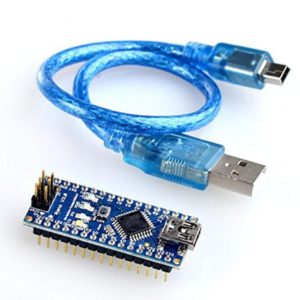 Arduino Boards, Microcontrollers & Boards
Nano R3 CH340 Chip Development Board – Compatible with Arduino – Soldered (With Cable)
- Arduino Nano compatible board based on ATmega328P
- Supports a wide range of sensors, modules, and shields
- Ideal for learning coding, electronics, and embedded systems
- Perfect controller board for beginner to advanced STEM projects
SKU: n/a -
Arduino Boards, Microcontrollers & Boards
Arduino Uno R3 Compatible Board Programmable with USB Cable
-36% Arduino Boards, Microcontrollers & Boards
Arduino Uno R3 Compatible Board Programmable with USB Cable
- Arduino Uno R3 compatible board based on ATmega328P
- Supports a wide range of sensors, modules, and shields
- Ideal for learning coding, electronics, and embedded systems
- Perfect controller board for beginner to advanced STEM projects
SKU: ygbm01
There are no reviews yet.