


HC-05 Bluetooth Module – 6 Pin Wireless Serial Communication
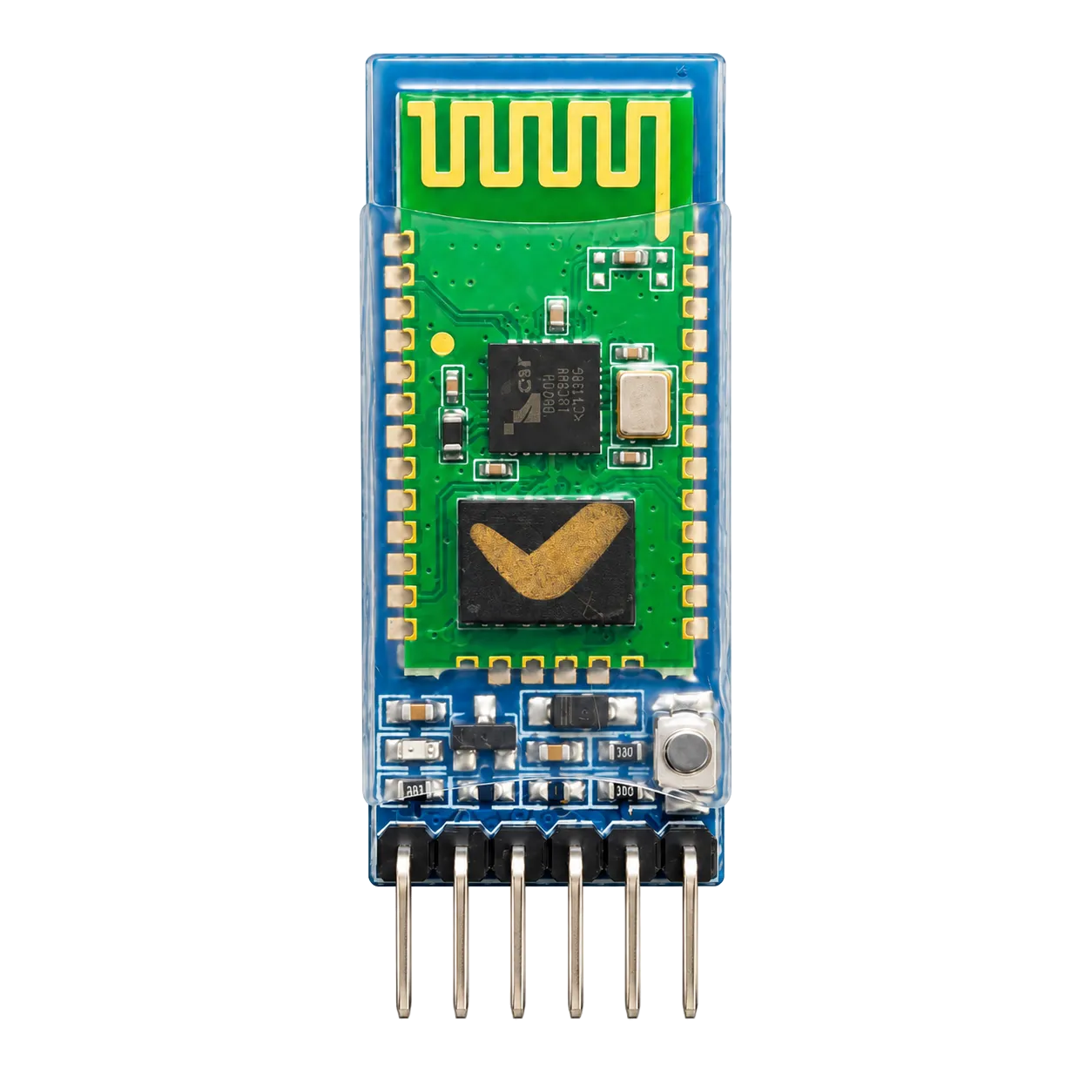
The HC-05 Bluetooth Module – 6 Pin is a wireless serial communication module designed to connect Arduino, microcontrollers and compatible Android devices using Bluetooth Classic technology. It features an integrated PCB antenna, UART communication interface, onboard status LED and configuration push button.
Key Features:
- HC-05 Bluetooth wireless serial communication module
- Bluetooth Classic 2.0 + EDR with Serial Port Profile (SPP)
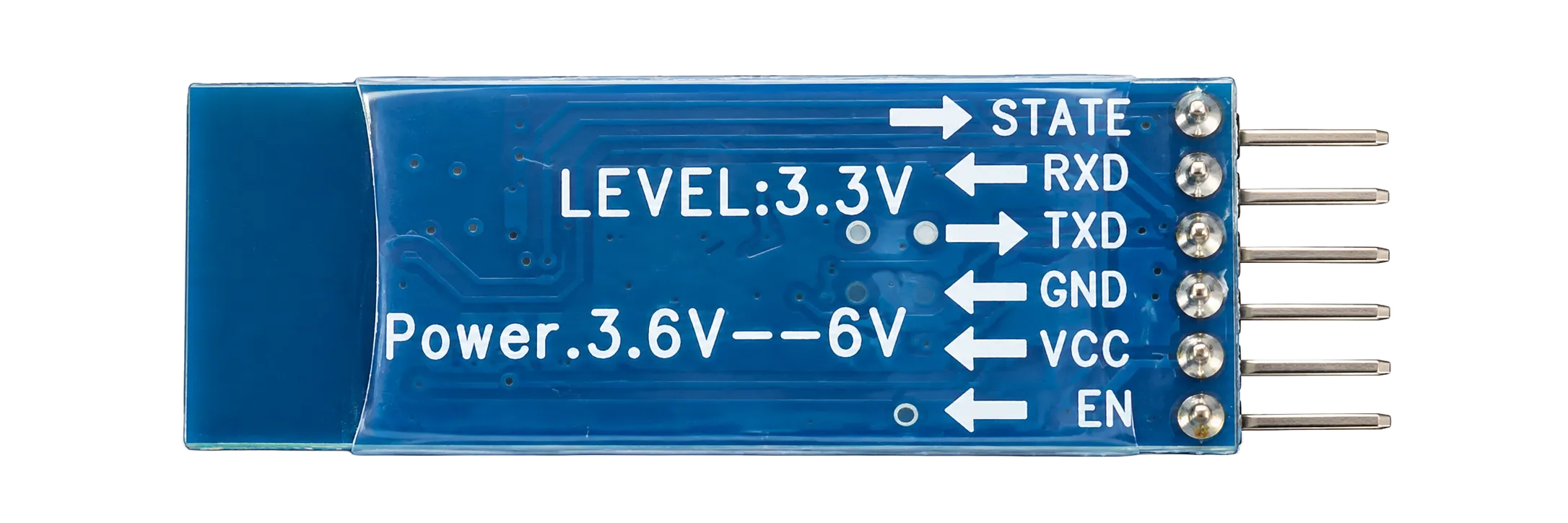
- 6-pin interface: STATE, RXD, TXD, GND, VCC and EN
- Breakout board supply voltage: 3.6–6V DC
- 3.3V UART logic levels
- Typical default data-mode baud rate: 9600
- AT command configuration support, depending on firmware
- Master/slave functionality on supported HC-05 firmware
- Integrated PCB antenna and Bluetooth status LED
- Onboard push button for configuration on supported board versions
- Suitable for Arduino Uno, Nano, Mega and compatible controllers
- Ideal for Bluetooth-controlled robots, wireless LED control and serial communication projects
Important: Use a voltage divider or logic-level shifter between a 5V Arduino TX output and the HC-05 RXD input. This module uses Bluetooth Classic, not Bluetooth Low Energy (BLE), and is generally unsuitable for standard iPhone/iPad serial-control applications.
Package Includes: 1 × HC-05 Bluetooth Module – 6 Pin (Blue PCB).
Buy the HC-05 Bluetooth Module online from Yagobotix with shipping across India and same-day delivery or pickup available in Surat.
HC-05 Bluetooth Module – 6 Pin Wireless Serial Communication
1. What Is an HC-05 Bluetooth Module?
The HC-05 Bluetooth Module is a wireless serial communication transceiver that allows microcontrollers to exchange data with compatible Bluetooth devices.
It uses Bluetooth Classic technology and supports serial communication through a UART interface.
The module is commonly used with Arduino Uno, Arduino Nano, Arduino Mega and other compatible controllers for Bluetooth-controlled robots, wireless switches and electronic automation projects.
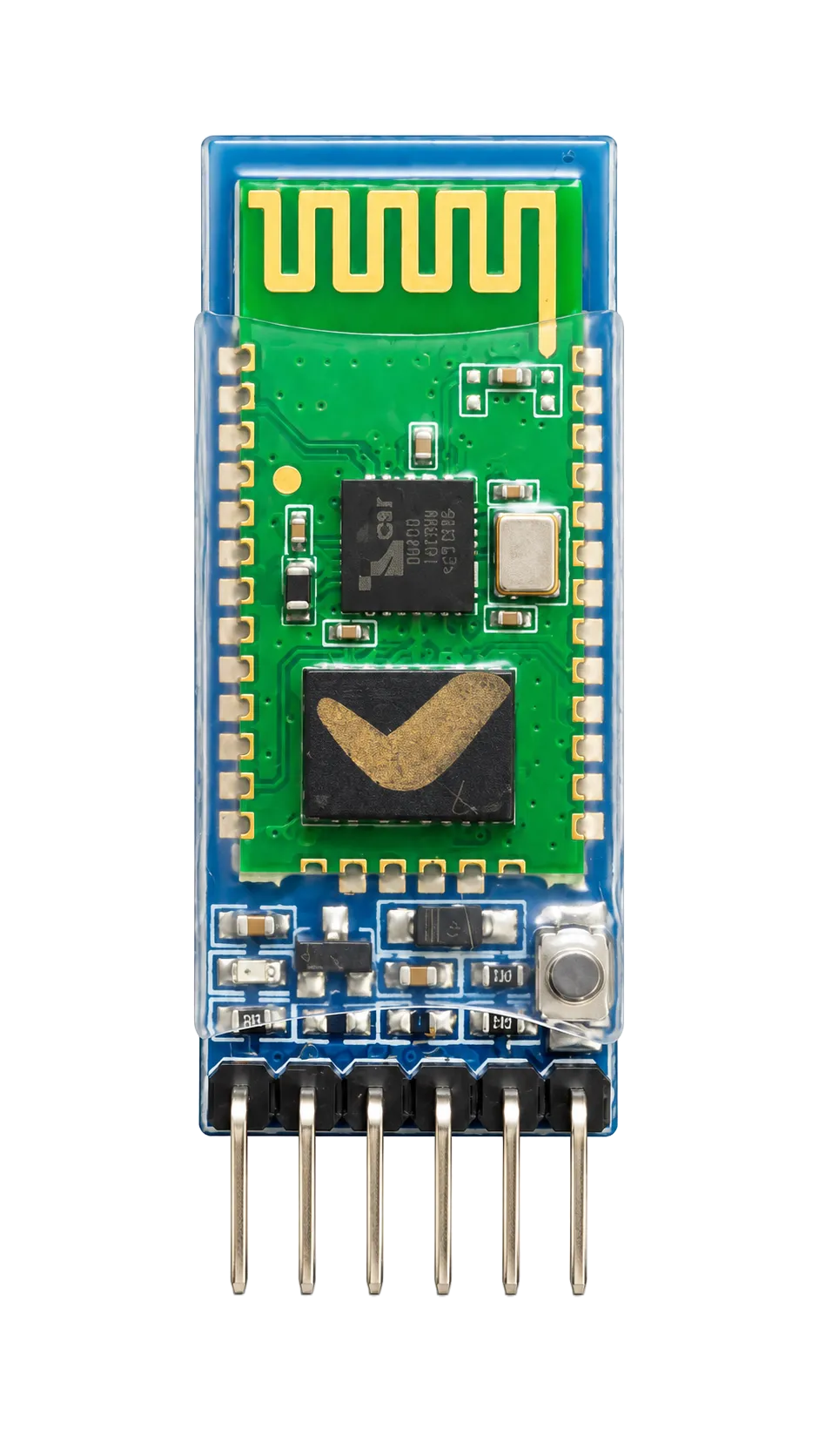
The six-pin blue PCB version features an integrated antenna, onboard status LED, configuration button and connection terminals.
The HC-05 is widely used in educational electronics projects because it simplifies wireless communication without requiring a Wi-Fi connection.
2. What Can You Build With an HC-05 Bluetooth Module?
The HC-05 Bluetooth Module is suitable for:
- Arduino Bluetooth-controlled robot cars
- Android-controlled LED switching
- Wireless serial communication
- Smartphone-controlled robotic vehicles
- Bluetooth-controlled servo motors
- Wireless sensor data monitoring
- Arduino-to-Arduino communication
- Bluetooth-controlled LCD displays
- Remote electronic switches
- Wireless command-based automation
- Robotics control panels
- STEM and engineering projects
It is particularly useful when you want to send commands or data wirelessly between a microcontroller and a compatible Bluetooth Classic device.
3. Who Is It For?
The HC-05 Bluetooth Module is suitable for:
- Arduino beginners
- School and college students
- Engineering students
- Robotics enthusiasts
- Embedded system developers
- Electronics hobbyists
- STEM educators and trainers
- DIY automation developers
It helps students understand serial communication, UART interfaces, wireless data transmission, device pairing and basic microcontroller programming.
4. How Does an HC-05 Bluetooth Module Work?
The HC-05 uses Bluetooth Classic wireless communication to exchange data with another compatible device.
It acts as a bridge between Bluetooth wireless data and UART serial signals.
Working Principle
Android Device / Computer → Bluetooth Connection → HC-05 Module → UART Serial Interface → Arduino
The communication also works in the opposite direction, allowing Arduino to send data back through the Bluetooth connection.
UART Communication
The module uses two primary serial communication pins:
TXD: Transmits serial data from the HC-05 module.
RXD: Receives serial data from the connected microcontroller.
The TXD and RXD pins connect to the corresponding receive and transmit functions of the controller.
Bluetooth Pairing
A compatible device must establish a Bluetooth connection with the HC-05.
Many modules use a default device name such as HC-05 and a pairing PIN such as 1234 or 0000.
These settings can vary depending on the firmware and previous configuration.
AT Command Mode
Supported HC-05 firmware allows configuration through AT commands.
Depending on the module version, users can modify settings such as:
- Bluetooth device name
- Pairing password
- UART communication speed
- Bluetooth operating role
- Connection parameters
The configuration button and EN pin behaviour may differ between board revisions.
5. Technical Specifications
| Specification | Details |
|---|---|
| Product Type | Bluetooth Serial Communication Module |
| Model | HC-05 |
| PCB Colour | Blue |
| Bluetooth Technology | Classic Bluetooth |
| Bluetooth Version | Commonly 2.0 + EDR |
| Serial Profile | SPP |
| Communication Interface | UART |
| Breakout Supply Voltage | 3.6–6V DC |
| UART Logic Level | 3.3V |
| Typical Default Data Baud Rate | 9600 |
| Typical AT Mode Baud Rate | 38400 |
| Wireless Frequency Band | 2.4 GHz |
| Wireless Range | Commonly around 10m under suitable conditions |
| Antenna | Integrated PCB antenna |
| Interface Pins | 6 |
| Pin Labels | STATE, RXD, TXD, GND, VCC, EN |
| Configuration Button | Present |
| Status LED | Present |
| Master/Slave Support | Firmware-dependent |
| Applications | Wireless serial communication and robotics |
Important Technical Notes
- The breakout board accepts a higher supply voltage than the Bluetooth chip’s internal operating voltage.
- Serial logic operates at approximately 3.3V.
- A 5V microcontroller TX signal must be reduced to a safe voltage before reaching HC-05 RXD.
- Bluetooth range depends on environmental conditions, antenna orientation and obstacles.
- The module communicates using Bluetooth Classic SPP, not Bluetooth Low Energy.
- Standard third-party iOS apps generally cannot use the HC-05 as a Bluetooth serial device.
- Default device names, PINs, baud rates and AT command capabilities vary by firmware.
6. HC-05 Bluetooth Module Pinout
The HC-05 Bluetooth Module has six connection pins.
| Pin | Function |
|---|---|
| STATE | Bluetooth connection status output |
| RXD | UART receive data |
| TXD | UART transmit data |
| GND | Ground |
| VCC | Positive supply input |
| EN | Enable / configuration control, board-dependent |
Pin Functions
STATE: Provides a status signal associated with the Bluetooth connection. Exact behaviour depends on the module firmware.
RXD: Receives serial data from the microcontroller. Uses approximately 3.3V logic.
TXD: Sends serial data from the Bluetooth module to the microcontroller.
GND: Connects to the common ground.
VCC: Supplies power to the breakout board. The photographed PCB specifies 3.6–6V.
EN: Associated with enabling the Bluetooth module or configuration mode, depending on the board design.
The onboard push button can be used to enter a configuration mode on compatible board versions.
7. How to Connect HC-05 Bluetooth Module to Arduino
The HC-05 can communicate with Arduino Uno using SoftwareSerial.
Required Components
- 1 × HC-05 Bluetooth Module
- 1 × Arduino Uno
- 1 × 1kΩ Resistor
- 1 × 2kΩ Resistor
- Breadboard
- Jumper Wires
- Compatible Android phone or Bluetooth Classic serial terminal
Arduino Wiring
| HC-05 Pin | Arduino Uno |
|---|---|
| VCC | 5V |
| GND | GND |
| TXD | D10 (SoftwareSerial RX) |
| RXD | D11 (SoftwareSerial TX) through voltage divider |
| STATE | Not required for basic communication |
| EN | Leave unconnected for normal data mode |
Voltage Divider for HC-05 RXD
The Arduino Uno uses 5V logic, while the HC-05 UART input uses approximately 3.3V logic.
Use a voltage divider:
Arduino D11 → 1kΩ Resistor → HC-05 RXD
Connect a 2kΩ resistor between HC-05 RXD and GND.
This reduces a 5V HIGH signal to approximately 3.33V.
Connection Procedure
- Disconnect power from Arduino.
- Connect HC-05 VCC to Arduino 5V.
- Connect HC-05 GND to Arduino GND.
- Connect HC-05 TXD to Arduino D10.
- Connect Arduino D11 to HC-05 RXD through the voltage divider.
- Power the Arduino.
- Look for the HC-05 status LED.
- Pair a compatible Bluetooth Classic device with the module.
- Upload a serial communication program.
- Test wireless data transmission.
8. Arduino Example Code
The following program allows Arduino to exchange serial data with a connected Bluetooth device.
Arduino Code
#include <SoftwareSerial.h>

// Arduino RX = 10, TX = 11
SoftwareSerial bluetooth(10, 11);

void setup() {
  Serial.begin(9600);
  bluetooth.begin(9600);

  Serial.println("HC-05 Bluetooth Ready");
}

void loop() {
  // Bluetooth to Serial Monitor
  while (bluetooth.available()) {
    char data = bluetooth.read();
    Serial.write(data);
  }

  // Serial Monitor to Bluetooth
  while (Serial.available()) {
    char data = Serial.read();
    bluetooth.write(data);
  }
}
How to Test the Module
- Connect the HC-05 to Arduino using the recommended wiring.
- Upload the code.
- Open the Arduino Serial Monitor at 9600 baud.
- Enable Bluetooth on a compatible Android device.
- Pair with the HC-05.
- Open a Bluetooth Classic SPP terminal application.
- Connect to the HC-05.
- Send a text message from the phone.
- Observe the text in the Arduino Serial Monitor.
- Type text into the Serial Monitor and send it to the Bluetooth terminal.
This project demonstrates two-way wireless serial communication.
9. Beginner Project: Bluetooth-Controlled LED
Build a Bluetooth-controlled LED system using Arduino Uno and the HC-05 module.
Components Required
- 1 × HC-05 Bluetooth Module
- 1 × Arduino Uno
- 1 × 5mm Red LED
- 1 × 330Ω Resistor
- 1 × 1kΩ Resistor
- 1 × 2kΩ Resistor
- Breadboard
- Jumper Wires
- Android phone with a compatible Bluetooth serial application
Wiring
| Component | Arduino |
|---|---|
| HC-05 VCC | 5V |
| HC-05 GND | GND |
| HC-05 TXD | D10 |
| HC-05 RXD | D11 through voltage divider |
| LED Anode | D8 through 330Ω resistor |
| LED Cathode | GND |
Arduino Code
#include <SoftwareSerial.h>

SoftwareSerial bluetooth(10, 11);

const int ledPin = 8;

void setup() {
  pinMode(ledPin, OUTPUT);
  digitalWrite(ledPin, LOW);

  Serial.begin(9600);
  bluetooth.begin(9600);

  Serial.println("Bluetooth LED Ready");
}

void loop() {
  if (bluetooth.available()) {
    char command = bluetooth.read();

    if (command == '1') {
      digitalWrite(ledPin, HIGH);
      bluetooth.println("LED ON");
    }

    else if (command == '0') {
      digitalWrite(ledPin, LOW);
      bluetooth.println("LED OFF");
    }
  }
}
Project Working
- The HC-05 pairs with the Android device.
- A Bluetooth terminal application sends a command to the module.
- The HC-05 passes that command to Arduino through UART.
- Arduino reads the received character.
- Sending
1turns the LED ON. - Sending
0turns the LED OFF. - Arduino sends a confirmation message to the connected device.
What Will Students Learn?
- Bluetooth Classic communication
- UART serial data transmission
- Arduino SoftwareSerial
- Wireless device pairing
- Command-based programming
- Remote LED control
This project can be extended to control compatible motor drivers, servo motors and electronic indicators.
10. Related Products
Complete your HC-05 Bluetooth projects with:
- Arduino Uno R3 Compatible Board
- Arduino Nano
- Arduino Mega
- BO Motor Dual Shaft
- 65mm BO Motor Wheel
- Motor Driver Module
- SG90 Servo Motor
- HC-SR04 Ultrasonic Sensor Module
- 16×2 LCD Display
- 16×2 LCD Display with I2C Interface
- 5mm Red LED
- 5mm Green LED
- RGB LED Module
- Breadboard
- Jumper Wires
- 1kΩ and 2kΩ Resistors
11. Related Tutorials
Explore these electronics learning topics:
- How to Connect HC-05 Bluetooth Module to Arduino
- HC-05 Bluetooth Module Pinout Explained
- Arduino Bluetooth-Controlled LED Project
- How to Build a Bluetooth-Controlled Robot
- How to Pair HC-05 with Android
- HC-05 AT Commands Tutorial
- How to Change HC-05 Bluetooth Name and Password
- HC-05 vs HC-06 Bluetooth Module
- Bluetooth Classic vs Bluetooth Low Energy
- How to Use HC-05 with ESP32
- How to Connect HC-05 with Arduino Nano
- Understanding UART Communication
12. Frequently Asked Questions
What is an HC-05 Bluetooth Module?
The HC-05 is a Bluetooth Classic wireless serial communication module used to exchange data between microcontrollers and compatible Bluetooth devices.
Can I use HC-05 with Arduino Uno?
Yes. It can be connected using UART communication, including SoftwareSerial on supported Arduino boards.
What is the operating voltage of HC-05?
The photographed breakout PCB specifies a 3.6–6V supply range.
What is the logic level of HC-05?
The UART interface uses approximately 3.3V logic levels.
Can I connect HC-05 RXD directly to Arduino TX?
Not when Arduino TX uses 5V logic. Use a voltage divider or level shifter.
How many pins does the module have?
Six: STATE, RXD, TXD, GND, VCC and EN.
What is the default Bluetooth name?
Many modules use HC-05 as the default device name, but this can vary.
What is the default pairing password?
Common defaults are 1234 or 0000. Check the supplied firmware configuration.
What is the default baud rate?
Many HC-05 modules use 9600 baud in normal data mode.
What is AT command mode?
AT command mode allows supported module settings to be viewed or changed using configuration commands.
Can HC-05 work as a master and slave?
Many genuine HC-05 firmware variants support master and slave configurations. The supported roles depend on the actual firmware.
Can I connect HC-05 to an Android phone?
Yes, with a compatible Android device and Bluetooth Classic serial application.
Does HC-05 work with iPhone?
Generally no for ordinary serial-control applications, because HC-05 uses Bluetooth Classic SPP rather than BLE.
Does HC-05 require Wi-Fi?
No. It communicates using Bluetooth and does not require Wi-Fi or an internet connection.
Can I build a Bluetooth robot using HC-05?
Yes. Arduino can receive movement commands through HC-05 and control a suitable motor driver.
Can HC-05 control motors directly?
No. The HC-05 provides communication signals and cannot directly supply the power required by motors.
Can HC-05 transmit sensor data?
Yes. A microcontroller can send sensor readings over the Bluetooth serial link.
What is the wireless range?
A typical HC-05 has a short-range Bluetooth connection, commonly around 10 metres in favourable conditions. Actual range varies.
What does the onboard LED indicate?
It provides module status information, such as power, pairing or connection state. Exact blink patterns depend on firmware.
Where can I buy an HC-05 Bluetooth Module in Surat?
You can buy the HC-05 Bluetooth Module online from Yagobotix with same-day delivery and pickup available in Surat.
13. What Is Included?
- 1 × HC-05 Bluetooth Module – 6 Pin Blue PCB
The assembled module includes:
- Bluetooth radio module
- Integrated PCB antenna
- Six-pin interface
- Onboard status LED
- Configuration push button
- Voltage regulator circuitry
Not included:
- Arduino board
- USB cable
- Breadboard
- Jumper wires
- Voltage divider resistors
- Battery or power supply
14. Compatibility
The HC-05 Bluetooth Module can be used with suitably interfaced microcontrollers, including:
- Arduino Uno
- Arduino Nano
- Arduino Mega
- ESP32
- ESP8266
- STM32
- Raspberry Pi
- Other UART-compatible controllers
Compatibility Notes
Arduino Uno / Nano / Mega: Compatible through a UART interface. Use a level divider or shifter for any 5V TX signal connected to HC-05 RXD.
ESP32: Can communicate through a hardware UART using appropriate 3.3V logic levels. The HC-05 breakout still requires its specified power supply.
Raspberry Pi: Can communicate through a properly configured UART interface with compatible voltage levels.
Android: Commonly works with Bluetooth Classic SPP applications.
iOS: Standard HC-05 serial communication is generally unsupported by ordinary iPhone and iPad apps.
15. Buy HC-05 Bluetooth Module Online in India
Add wireless communication to your electronics projects with the HC-05 Bluetooth Module – 6 Pin from Yagobotix.
Featuring Bluetooth Classic wireless serial communication, a UART interface, integrated antenna and convenient breakout board, the HC-05 is suitable for Arduino, robotics, automation prototypes and educational electronics projects.
Whether you are building a Bluetooth-controlled robot, creating a wireless sensor monitoring system or learning serial communication, the HC-05 provides a practical introduction to short-range wireless electronics.
Why Choose Yagobotix?
- HC-05 Bluetooth serial communication module
- Six-pin breakout board
- Suitable for Arduino and compatible microcontrollers
- Components for students, engineers and robotics enthusiasts
- Shipping across India
- Same-day delivery available in Surat
- Same-day pickup available in Surat
Same-day services are subject to stock availability, delivery coverage and applicable order cut-off times.
Add the HC-05 Bluetooth Module to your cart and start building your next wireless electronics project with Yagobotix!
Based on 0 reviews
Only logged in customers who have purchased this product may leave a review.
Related products
-
Modules, Motor Driver Modules
L298N Based Dual Motor Driver Module (2A) with PWM Speed Control
- Dual H-bridge motor driver for controlling two DC motors
- Supports speed control using PWM signals
- Ideal for robotics and motor control learning
- Compatible with Arduino and other microcontroller boards
SKU: ygb-com-1 -
Modules, Power Modules
HW-316 12V 4 Channel Relay Module with Optocoupler – Blue PCB
The HW-316 12V 4 Channel Relay Module is a four-channel electromagnetic relay board designed to control four independent electrical circuits using compatible microcontrollers and electronic control systems. It features four 12V relays, EL817 optocouplers, onboard indicator LEDs and screw terminal connections.
Key Features:
- HW-316 four-channel relay module
- 4 independent 12V electromagnetic relays
- JQC3F-12VDC-C relay components
- 4 onboard EL817 optocouplers
- Individual IN1, IN2, IN3 and IN4 control inputs
- Commonly active-LOW control inputs; verify before use
- Normally Open (NO), Common (COM) and Normally Closed (NC) contacts
- JD-VCC/VCC jumper for relay and input supply configuration
- Individual relay status indicator LEDs
- 12 screw terminals for connecting external circuits
- Blue PCB with four mounting holes
- Suitable for Arduino, automation prototypes and compatible controller-based projects
Power Requirement: The relay coils require a suitable 12V DC supply. Control-side voltage compatibility depends on the JD-VCC jumper configuration and actual board circuitry.
Package Includes: 1 × HW-316 12V 4 Channel Relay Module.
Safety Note: Relay contact ratings are not a guarantee of the complete module’s safe load capacity. Use appropriate protection and qualified installation for high-voltage applications.
Buy the HW-316 12V 4 Channel Relay Module online from Yagobotix with shipping across India and same-day delivery or pickup available in Surat.
SKU: YGB-REL-HW316-12V-4CH -
Display Modules, Modules
Single Digit 7 Segment Display – 0.56 Inch Red Common Cathode
The Single Digit 7 Segment Display is a compact 0.56-inch red LED display with a common cathode configuration. Featuring seven individually controlled LED segments and a decimal point, it is ideal for displaying numbers, counters and numeric information in electronic circuits.
Key Features:
- Single-digit 7-segment LED display
- 0.56-inch digit height
- Red LED illumination
- Common cathode (CC) configuration
- 10-pin through-hole design
- Suitable for Arduino, ESP32 and custom PCB projects
- Ideal for digital counters, timers and numeric indicators
Buy the Single Digit 7 Segment Display online from Yagobotix with shipping across India and same-day delivery or pickup available in Surat.
SKU: YGB-DSP-7SEG-056-CC -
Display Modules, Modules
Single Digit 7 Segment Display – 0.56 Inch Red Common Anode
The Common Anode 7 Segment Display is a compact, single-digit LED display designed to show numbers from 0 to 9, selected characters and a decimal point. Featuring a common positive connection and individually controlled LED segments, it is ideal for digital counters, numeric indicators, timers and DIY electronics projects.
Key Features:
- Single-digit seven-segment LED display
- Common anode (CA) configuration
- Individually controlled LED segments
- Through-hole PCB mounting
- Suitable for Arduino, ESP32 and custom electronic circuits
- Ideal for counters, timers and educational electronics projects
Buy the Common Anode 7 Segment Display online from Yagobotix with shipping across India and same-day delivery or pickup available in Surat.
SKU: YGB-DSP-7SEG-056-CA

There are no reviews yet.